Openbravo Issue Tracking System - Retail Modules |
| View Issue Details |
|
| ID | Project | Category | View Status | Date Submitted | Last Update |
| 0054062 | Retail Modules | Discounts and Promotions | public | 2023-11-30 16:44 | 2023-12-20 11:51 |
|
| Reporter | noemieroussel | |
| Assigned To | Rajesh_18 | |
| Priority | high | Severity | major | Reproducibility | have not tried |
| Status | closed | Resolution | fixed | |
| Platform | | OS | 5 | OS Version | |
| Product Version | | |
| Target Version | | Fixed in Version | RR24Q1 | |
| Merge Request Status | approved |
| Review Assigned To | |
| OBNetwork customer | Gold |
| Support ticket | |
| Regression level | |
| Regression date | |
| Regression introduced in release | |
| Regression introduced by commit | |
| Triggers an Emergency Pack | No |
|
| Summary | 0054062: When adding store set on OPECOM with end date>today, an error message appears |
| Description | When adding store set on OPECOM with end date>today, an error message appears |
| Steps To Reproduce | Steps to reproduce.
Go to “Store set” window and define a regular store set S1 active with:
store A set as active and with starting date DA1 > D2 (in the future regarding OPECOM)
store B set as active and with starting date DB1 = D and ending date DB2 = D (today)
store C set as active and with starting date DC1 = D1 and ending date DC2 = D2 (same dates as OPECOM)
store E set as active and with starting date DE1 < D1 and ending date DE2 < D2 (in the past regarding OPECOM
2. Define a regular store set S2 active with:
store F set as active and with starting date DF1 and ending date DF2 < D1 (in the past regarding OPECOM)
store G set as active and with starting date DG1 < D1 and ending date DG2 > D2 (OPECOM included)
store H set as active and with starting date D < DH1 < D2 (included in OPECOM but later than today)
store I set as inactive and with starting date DI1 < D1 and ending date DI2 > D2 (OPECOM included)
3. Go to the “Commercial operation” window.
4. Create a commercial operation with starting date in the past regarding today's date, and ending date in the future regarding today's date.
5. Click on “Add Stores” button and select “Sets of stores” in the filter type → See that the dates are automatically fulfilled with starting and ending date of the OPECOM.
6. Select those 2 stores sets.
7. Click on “Done”.
→ See the following message on the screenshot (from the 22th of Nov) |
| Proposed Solution | |
| Additional Information | |
| Tags | No tags attached. |
| Relationships | |
| Attached Files |  test nro mantis.png (106,874) 2023-11-30 16:44 test nro mantis.png (106,874) 2023-11-30 16:44
https://issues.openbravo.com/file_download.php?file_id=19192&type=bug
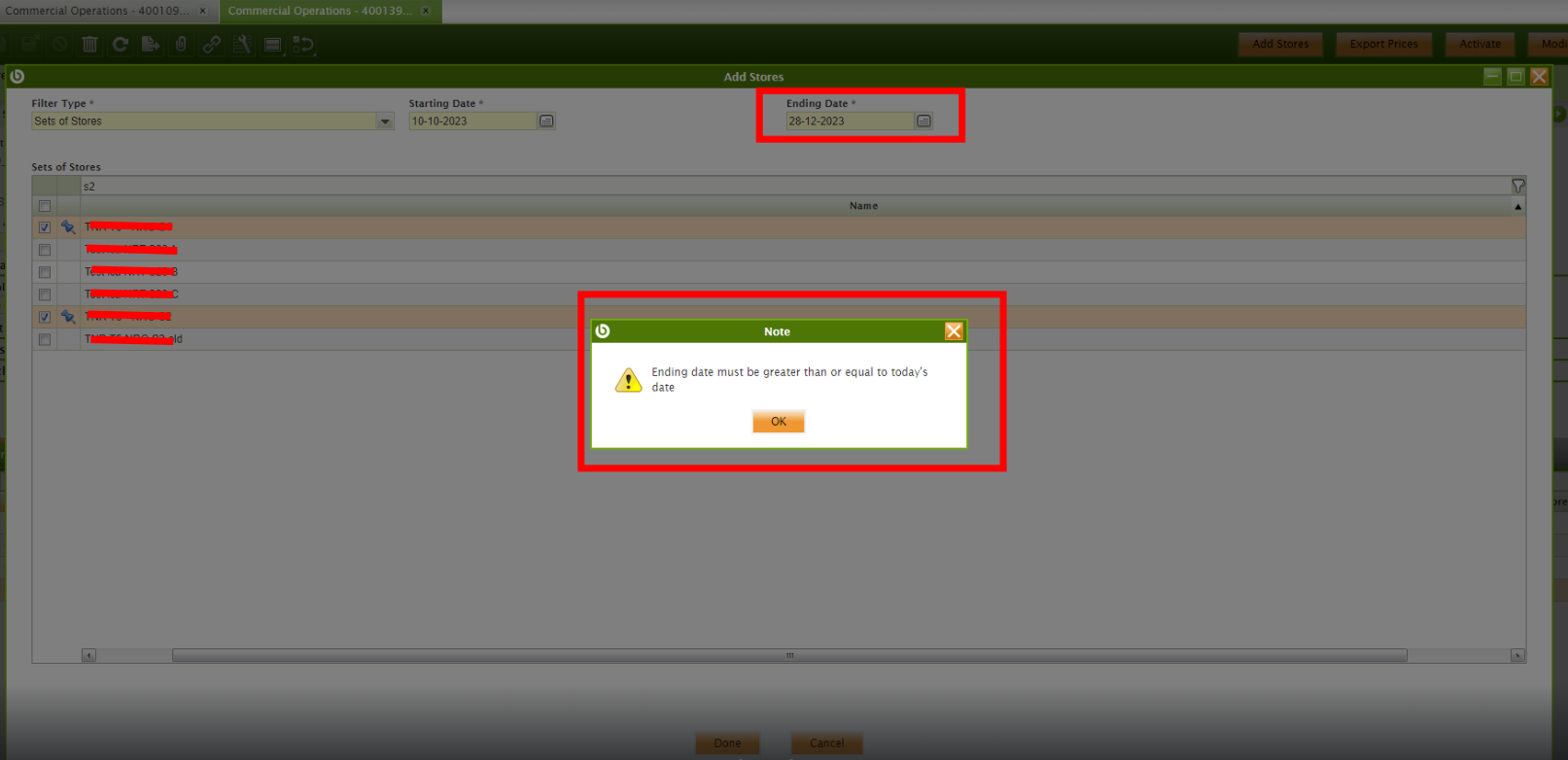
|
|
| Issue History |
| Date Modified | Username | Field | Change |
| 2023-11-30 16:44 | noemieroussel | New Issue | |
| 2023-11-30 16:44 | noemieroussel | Assigned To | => Retail |
| 2023-11-30 16:44 | noemieroussel | File Added: test nro mantis.png | |
| 2023-11-30 16:44 | noemieroussel | OBNetwork customer | => Gold |
| 2023-11-30 16:44 | noemieroussel | Triggers an Emergency Pack | => No |
| 2023-12-11 07:17 | Rajesh_18 | Assigned To | Retail => Rajesh_18 |
| 2023-12-11 11:41 | noemieroussel | Steps to Reproduce Updated | bug_revision_view_page.php?rev_id=27220#r27220 |
| 2023-12-11 12:37 | Rajesh_18 | Status | new => scheduled |
| 2023-12-12 06:33 | hgbot | Merge Request Status | => open |
| 2023-12-12 06:33 | hgbot | Note Added: 0158068 | |
| 2023-12-20 11:51 | hgbot | Merge Request Status | open => approved |
| 2023-12-20 11:51 | hgbot | Resolution | open => fixed |
| 2023-12-20 11:51 | hgbot | Status | scheduled => closed |
| 2023-12-20 11:51 | hgbot | Note Added: 0158400 | |
| 2023-12-20 11:51 | hgbot | Fixed in Version | => 24Q1 |
| 2023-12-20 11:51 | hgbot | Note Added: 0158401 | |