Openbravo Issue Tracking System - Openbravo ERP |
| View Issue Details |
|
| ID | Project | Category | View Status | Date Submitted | Last Update |
| 0033260 | Openbravo ERP | Z. Others | public | 2016-06-14 15:27 | 2016-06-15 10:16 |
|
| Reporter | psanjuan | |
| Assigned To | Triage Omni OMS | |
| Priority | urgent | Severity | major | Reproducibility | always |
| Status | closed | Resolution | invalid | |
| Platform | | OS | 20 | OS Version | Community Appliance |
| Product Version | | |
| Target Version | | Fixed in Version | | |
| Merge Request Status | |
| Review Assigned To | psanjuan |
| OBNetwork customer | No |
| Web browser | |
| Modules | Core |
| Support ticket | |
| Regression level | |
| Regression date | |
| Regression introduced in release | |
| Regression introduced by commit | |
| Triggers an Emergency Pack | No |
|
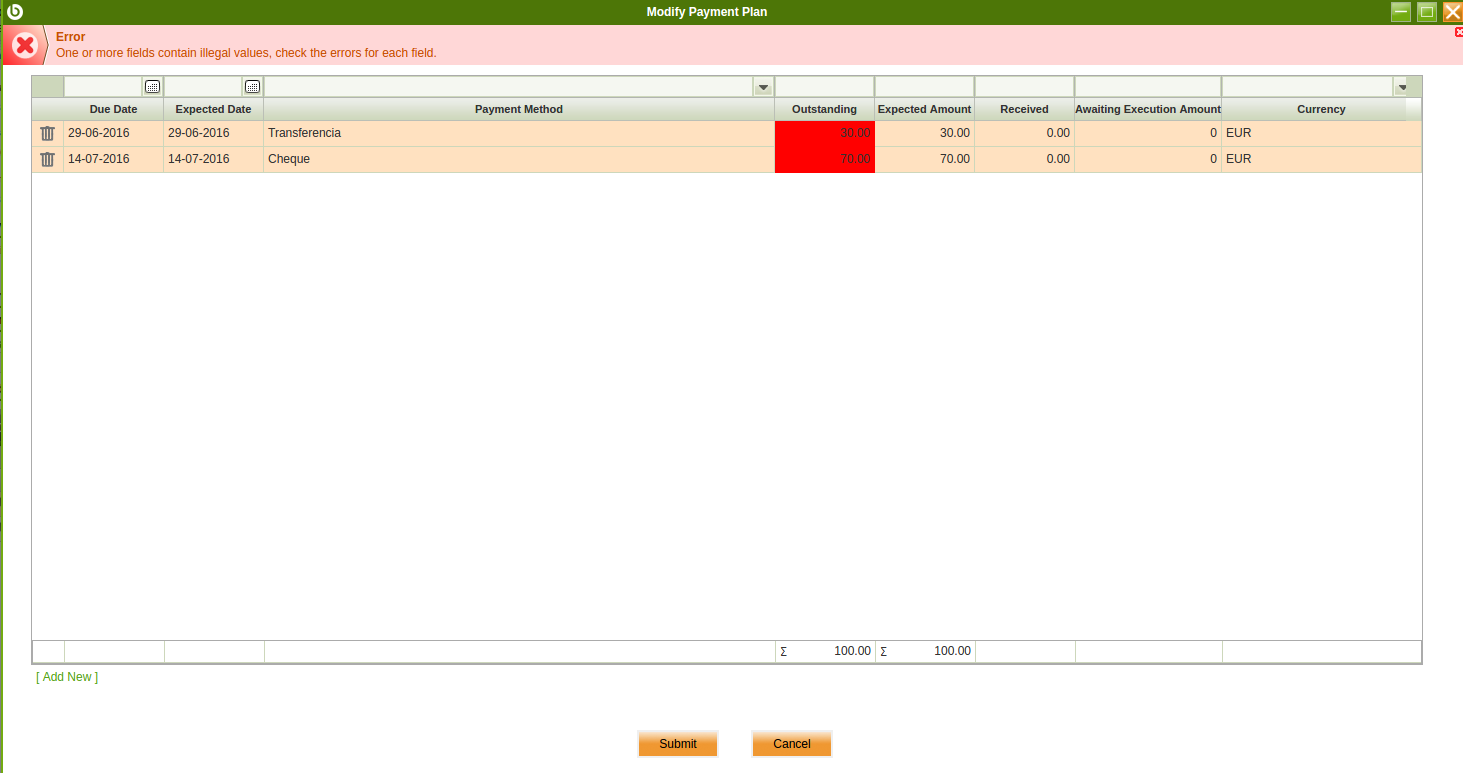
| Summary | 0033260: Error message shown in Modify Payment Plan after changing Payment Method field |
| Description | Error message shown in Modify Payment Plan after changing Payment Method field
Error shown is:
One or more fields contain illegal values, check the errors for each field. |
| Steps To Reproduce | - As system administrator, access to "Windows, tabs and fields" and go to Sales Invoice window | Payment Plan tab to set "Modify payment plan" field as DISPLAYED. Logout/login
- Access Payment Terms window and configure new record as "Overdue Payment Days Rule"=30 in Header. Add Line with "Percentage due"=30 and "Overdue Payment Days Rule"=15
- Register a Sales invoice for F&B España org using this payment terms. Add any line and process invoice. Use "Cheque" as payment method of the invoice by making sure that this payment method is setup as described below:
Payment in Allowed = Yes
Receive Payments in Multiple Currencies = Yes
Execution type = Manual
- Access Financial Account "Cuenta de banco", go to Payment Method tab and set "Transferencia" payment method as "Automatic", "Simple exec process" and "Deferred=YES"
- From invoice header, run "Add Payment" process. Select only first payment plan record and process
- Navigate to created Payment In document, which should be in "Payment Received" status. Click on "Reactivate" button and select "Reactivate and delete lines option". Realize that payment is correct as it is empty and do not referred to the sales invoice.
- Access Sales Invoice and go to Payment Plan tab. Run "Modify Payment Plan" process from previous record and change Payment Method to "Transferencia". Press Submit. Error attached is shown.
|
| Proposed Solution | |
| Additional Information | |
| Tags | No tags attached. |
| Relationships | | related to | defect | 0033082 | 3.0PR16Q3 | closed | AtulOpenbravo | Payment Schedule Detail duplicated when using "Modify Payment Plan" process under certain circumstances |
|
| Attached Files |  Issue 33260.png (40,595) 2016-06-14 15:34 Issue 33260.png (40,595) 2016-06-14 15:34
https://issues.openbravo.com/file_download.php?file_id=9520&type=bug
|
|
| Issue History |
| Date Modified | Username | Field | Change |
| 2016-06-14 15:27 | psanjuan | New Issue | |
| 2016-06-14 15:27 | psanjuan | Assigned To | => Triage Finance |
| 2016-06-14 15:27 | psanjuan | OBNetwork customer | => No |
| 2016-06-14 15:27 | psanjuan | Modules | => Core |
| 2016-06-14 15:27 | psanjuan | Triggers an Emergency Pack | => No |
| 2016-06-14 15:28 | psanjuan | Relationship added | related to 0033082 |
| 2016-06-14 15:33 | psanjuan | Steps to Reproduce Updated | bug_revision_view_page.php?rev_id=12383#r12383 |
| 2016-06-14 15:34 | psanjuan | File Added: Issue 33260.png | |
| 2016-06-15 10:16 | psanjuan | Review Assigned To | => psanjuan |
| 2016-06-15 10:16 | psanjuan | Note Added: 0087290 | |
| 2016-06-15 10:16 | psanjuan | Status | new => closed |
| 2016-06-15 10:16 | psanjuan | Resolution | open => invalid |