Openbravo Issue Tracking System - Openbravo ERP |
| View Issue Details |
|
| ID | Project | Category | View Status | Date Submitted | Last Update |
| 0020402 | Openbravo ERP | A. Platform | public | 2012-05-03 13:00 | 2012-05-25 12:10 |
|
| Reporter | rgoris | |
| Assigned To | alostale | |
| Priority | normal | Severity | major | Reproducibility | sometimes |
| Status | closed | Resolution | fixed | |
| Platform | | OS | 5 | OS Version | |
| Product Version | | |
| Target Version | | Fixed in Version | | |
| Merge Request Status | |
| Review Assigned To | |
| OBNetwork customer | No |
| Web browser | |
| Modules | Core |
| Support ticket | |
| Regression level | |
| Regression date | |
| Regression introduced in release | |
| Regression introduced by commit | |
| Triggers an Emergency Pack | No |
|
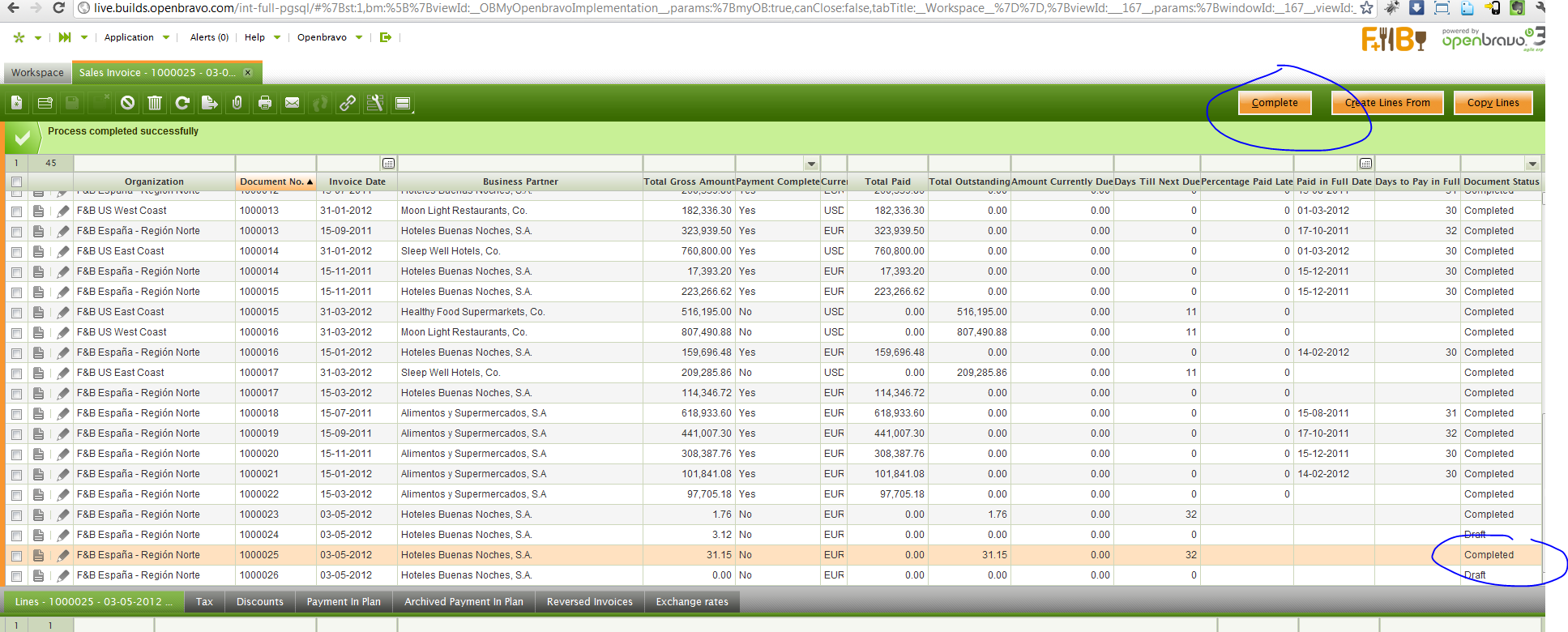
| Summary | 0020402: Completed button is visible when document is already completed |
| Description | This is a matter of not "refreshing" the button status I guess. The Completed button is visible when document is already completed, for sales invoices. |
| Steps To Reproduce | Create a new sales invoice, save it and leave it in Draft status.
Make sure that both header and line level are in grid mode.
Select a line.
Hit the Complete button and complete the invoice.
Notice that the button Complete remains. |
| Proposed Solution | |
| Additional Information | |
| Tags | No tags attached. |
| Relationships | | related to | defect | 0020227 | | closed | alostale | Window with three level tabs: G/L Journal. Buttons for second level tab don't get refreshed | | related to | defect | 0019713 | | closed | alostale | Button's display logic isn't correctly applied for a parent's tab button |
|
| Attached Files |  CompletedButtonMustGo.PNG (197,776) 2012-05-03 13:00 CompletedButtonMustGo.PNG (197,776) 2012-05-03 13:00
https://issues.openbravo.com/file_download.php?file_id=5185&type=bug
|
|
| Issue History |
| Date Modified | Username | Field | Change |
| 2012-05-03 13:00 | rgoris | New Issue | |
| 2012-05-03 13:00 | rgoris | Assigned To | => alostale |
| 2012-05-03 13:00 | rgoris | File Added: CompletedButtonMustGo.PNG | |
| 2012-05-03 13:00 | rgoris | Modules | => Core |
| 2012-05-03 13:00 | rgoris | OBNetwork customer | => No |
| 2012-05-08 12:44 | alostale | Relationship added | related to 0019713 |
| 2012-05-08 15:00 | alostale | Relationship added | related to 0020227 |
| 2012-05-08 15:06 | alostale | Note Added: 0048449 | |
| 2012-05-08 16:55 | alostale | Note Added: 0048458 | |
| 2012-05-08 16:58 | hgbot | Checkin | |
| 2012-05-08 16:58 | hgbot | Note Added: 0048459 | |
| 2012-05-08 16:58 | hgbot | Status | new => resolved |
| 2012-05-08 16:58 | hgbot | Resolution | open => fixed |
| 2012-05-08 16:58 | hgbot | Fixed in SCM revision | => http://code.openbravo.com/erp/devel/pi/rev/938f2b7e11c7e0417e1b56d5ab669b15208d8bea [^] |
| 2012-05-09 11:17 | rgoris | Note Added: 0048495 | |
| 2012-05-09 11:17 | rgoris | Status | resolved => closed |
| 2012-05-25 12:10 | hudsonbot | Checkin | |
| 2012-05-25 12:10 | hudsonbot | Note Added: 0049055 | |
|
Notes |
|
|
|
|
This can be reproduced invoking button in header tab in case header tab is in grid view, regardless view in child tab. |
|
|
|
|
Fix is not risky
Test plan:
-Follow steps to reproduce described in this issue
-Follow steps to reproduce described in issue 0020227
-Follow steps to reproduce described in issue 0019713 |
|
|
|
(0048459)
|
|
hgbot
|
|
2012-05-08 16:58
|
|
Repository: erp/devel/pi
Changeset: 938f2b7e11c7e0417e1b56d5ab669b15208d8bea
Author: Asier Lostalé <asier.lostale <at> openbravo.com>
Date: Tue May 08 16:57:32 2012 +0200
URL: http://code.openbravo.com/erp/devel/pi/rev/938f2b7e11c7e0417e1b56d5ab669b15208d8bea [^]
fixed bug 20402, fixed bug 20227, fixed bug 19713
Fixed toolbar button refresh when using a button defined in a parent tab
---
M modules/org.openbravo.client.application/web/org.openbravo.client.application/js/toolbar/ob-action-button.js
---
|
|
|
|
(0048495)
|
|
rgoris
|
|
2012-05-09 11:17
|
|
|
|
|
|
|