Openbravo Issue Tracking System - Openbravo ERP |
| View Issue Details |
|
| ID | Project | Category | View Status | Date Submitted | Last Update |
| 0017165 | Openbravo ERP | A. Platform | public | 2011-05-15 11:10 | 2011-05-16 19:02 |
|
| Reporter | rgoris | |
| Assigned To | marvintm | |
| Priority | high | Severity | major | Reproducibility | have not tried |
| Status | closed | Resolution | fixed | |
| Platform | | OS | 5 | OS Version | |
| Product Version | pi | |
| Target Version | 3.0RC7 | Fixed in Version | 3.0RC7 | |
| Merge Request Status | |
| Review Assigned To | |
| OBNetwork customer | No |
| Web browser | |
| Modules | Core |
| Support ticket | |
| Regression level | |
| Regression date | |
| Regression introduced in release | |
| Regression introduced by commit | |
| Triggers an Emergency Pack | No |
|
| Summary | 0017165: Uploading attachment process does not end |
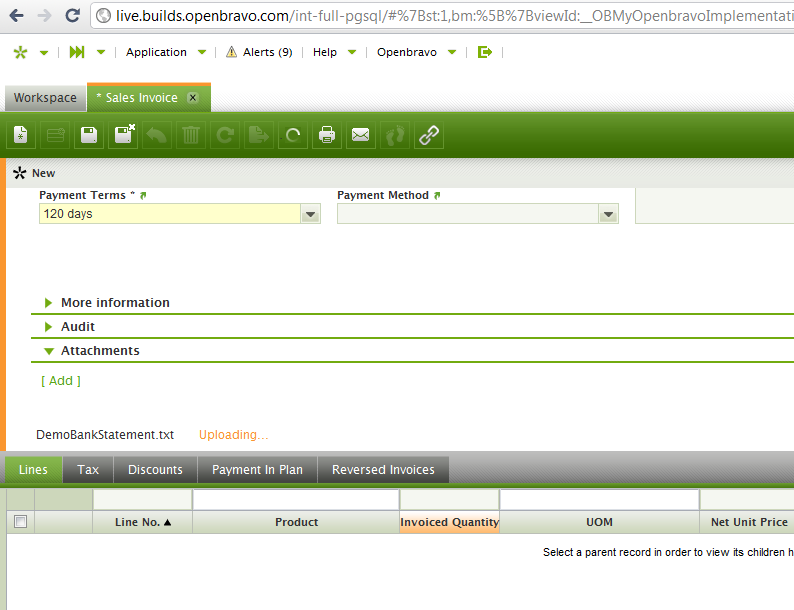
| Description | When uploading a (small) file, the Uploading... status indicator (orange text) does not seem to disappear. I waited 10 minutes. |
| Steps To Reproduce | |
| Proposed Solution | |
| Additional Information | |
| Tags | No tags attached. |
| Relationships | | related to | defect | 0017167 | 3.0MP0 | closed | marvintm | Modify behavior when clicking Attachments button in toolbar | | related to | defect | 0017048 | 3.0MP3 | closed | alostale | It is not possible to create a Note in new documents |
|
| Attached Files |  uploadingdoesntend.PNG (47,786) 2011-05-15 11:10 uploadingdoesntend.PNG (47,786) 2011-05-15 11:10
https://issues.openbravo.com/file_download.php?file_id=3998&type=bug
|
|
| Issue History |
| Date Modified | Username | Field | Change |
| 2011-05-15 11:10 | rgoris | New Issue | |
| 2011-05-15 11:10 | rgoris | Assigned To | => alostale |
| 2011-05-15 11:10 | rgoris | File Added: uploadingdoesntend.PNG | |
| 2011-05-15 11:10 | rgoris | Modules | => Core |
| 2011-05-15 11:10 | rgoris | OBNetwork customer | => No |
| 2011-05-15 11:11 | rgoris | Target Version | 3.0MP0 => 3.0RC7 |
| 2011-05-16 08:13 | alostale | Relationship added | related to 0017167 |
| 2011-05-16 08:14 | alostale | Note Added: 0036994 | |
| 2011-05-16 08:15 | alostale | Status | new => feedback |
| 2011-05-16 09:37 | rgoris | Note Added: 0036998 | |
| 2011-05-16 09:55 | alostale | Relationship added | related to 0017048 |
| 2011-05-16 09:59 | alostale | Status | feedback => scheduled |
| 2011-05-16 09:59 | alostale | Assigned To | alostale => marvintm |
| 2011-05-16 09:59 | alostale | fix_in_branch | => pi |
| 2011-05-16 10:55 | hgbot | Checkin | |
| 2011-05-16 10:55 | hgbot | Note Added: 0037003 | |
| 2011-05-16 10:55 | hgbot | Status | scheduled => resolved |
| 2011-05-16 10:55 | hgbot | Resolution | open => fixed |
| 2011-05-16 10:55 | hgbot | Fixed in SCM revision | => http://code.openbravo.com/erp/devel/pi/rev/843513568c69bc375020e208f12656bda1fe3857 [^] |
| 2011-05-16 11:26 | dbaz | Status | resolved => closed |
| 2011-05-16 11:26 | dbaz | Fixed in Version | => 3.0RC7 |
| 2011-05-16 19:02 | hudsonbot | Checkin | |
| 2011-05-16 19:02 | hudsonbot | Note Added: 0037044 | |
|
Notes |
|
|
|
I'm not able to reproduce it.
How big was the file you were uploading? Did you get error in javascript or in the backend log? |
|
|
|
(0036998)
|
|
rgoris
|
|
2011-05-16 09:37
|
|
It goes for every NEW record. It still shows the attachments section with the [ Add ] link, whereas the toolbar button for attachments is disabled.
So user can still add an attachment, but it does not work.
Solution, hide the section, just as for Notes. |
|
|
|
(0037003)
|
|
hgbot
|
|
2011-05-16 10:55
|
|
Repository: erp/devel/pi
Changeset: 843513568c69bc375020e208f12656bda1fe3857
Author: Antonio Moreno <antonio.moreno <at> openbravo.com>
Date: Mon May 16 10:55:02 2011 +0200
URL: http://code.openbravo.com/erp/devel/pi/rev/843513568c69bc375020e208f12656bda1fe3857 [^]
Fixed issue 17165. Attachments cannot be added when the record is new and hasn't been saved.
---
M modules/org.openbravo.client.application/web/org.openbravo.client.application/js/ob-view-form-attachments.js
M modules/org.openbravo.client.application/web/org.openbravo.client.application/js/ob-view-form.js
---
|
|
|
|
|
|